GivingHQ: better AI prompts for nonprofits, on your terms

.svg)
.svg)
.svg)
.svg)

AI has found its way into nonprofit work, sometimes by design and sometimes one staff member at a time. A development director writes subject lines in ChatGPT. A volunteer selects emojis for social posts using Gemini. Of course, some teams have decided, after real discussion, that AI has no place in their work, period.
Each of those choices reflects a nonprofit’s needs and values. The use of artificial intelligence can trigger strong reactions, and we understand and empathize. People worry about authenticity, jobs, privacy and the planet. Those concerns are legitimate and nobody should feel pressured to set them aside.
Here’s what we believe at Give Lively: AI can be useful for nonprofit teams, especially teams stretched thin, but never at the expense of a human touch and never in breach of organizational ethos. The relationships that sustain your mission – the thank-you calls, the handwritten notes, the stories told with care – belong to people. If AI earns a place in your work, it should be handling routine groundwork, leaving your team more time and energy for the moments that need a person.
Introducing GivingHQ
The belief above shaped GivingHQ, a free tool that turns your nonprofit’s mission, voice and goals into detailed AI prompts for fundraising, email, social media, donor engagement and storytelling. Our goal with GivingHQ is not to push AI. Instead, GivingHQ is an effort to help nonprofits that use AI get more finely tuned and effective responses from it, always in a way that respects their ethics and desires.
If your team uses AI, you probably know the frustration. You ask for a fundraising email and get back something polite, generic and nothing like you. GivingHQ doesn’t write your donor copy. It writes the instructions you paste into the AI assistant you already use, so what comes back sounds more like you from the start.
Better context, better drafts
Too many people ask AI to “write a fundraising email.” The AI doesn’t know who you serve, how you sound, what you’re raising money for or by when, so it guesses. Often badly. That bland, off-brand response is the result.
GivingHQ writes the kind of AI prompt you would expect from a senior fundraising strategist. That’s because, before the AI drafts a word, the prompt assigns it that role and hands it your goals, programs, audiences, brand voice, campaign goal, deadline and tone.
Others in the nonprofit sector are seeing value in similar approaches. GivingTuesday’s AI Corner, produced in partnership with TechSoup, dedicates a section of its reading list to giving AI something to work with. TechSoup’s AI for Nonprofits hub notes that many nonprofits already assign AI tasks like donor thank-you emails and year-end campaign plans, but urges every organization to write an AI use policy before staff get too involved.
For many nonprofits, the first question is whether to use AI at all. The second question, for those who answer yes, is how to use it well. GivingHQ is built for the second question and honors whatever answer you give to the first.
AI’s environmental cost is real
Honest conversations about AI acknowledge its ecological footprint. The data centers that power AI platforms consume enormous amounts of electricity. The International Energy Agency reports that data center electricity demand rose 17% in 2025 and projects that power use by AI-focused data centers will triple by 2030. That’s a serious problem. Many nonprofits feel it directly because their missions center on climate, conservation, environmental justice and related issues.
We aren’t immune to this tension. Give Lively’s values are part of the bedrock of who we are, and they include a commitment to environmental sustainability and to confronting the growing climate emergency. We also feel pressure to keep pace with the tools nonprofits rely on. Creating GivingHQ meant weighing commitments against business realities. We expect to keep reviewing and searching for a balance.
To be clear, GivingHQ doesn’t erase environmental costs or absolve us of our use of AI. But it can help nonprofits that already use AI to use less of it. A vague request often turns into a long chain of regenerated drafts and follow-up corrections. A detailed prompt that carries your full context from the start gets you to usable copy in fewer attempts.
And if your organization’s environmental standards rule out AI altogether, we fully support that decision. Your values should shape your tools, not the other way around.
How to use GivingHQ in six steps
The whole process takes about five minutes. See below for two ways (short video and written descriptions) to walk through it with NY Pet Foundation, the fictional volunteer-powered animal rescue organization featured in the GivingHQ step-by-step guide:
1. Find your nonprofit
Go to givinghq.givelively.org, select "Create your prompts" and enter your email address. Start typing your organization’s name. GivingHQ searches national nonprofit databases as you type and, once you select your organization, pulls in public details. If data is missing or incorrect, you can enter it manually.
2. Build your profile
GivingHQ pre-fills what it finds, including your mission, cause area and programs. Review it and correct anything out of date. Then add what only you know: who you talk to, how you sound and what to avoid. Your name is the only required field, but every detail you add sharpens the prompts you generate later.
3. Review your recommended ideas
Based on your profile, GivingHQ suggests prompt ideas that fit your cause, your channels and the time of year. NY Pet Foundation sees ideas like year-end appeals, foster recruitment and donor thank-yous. Choose one or move on to the full library.
4. Choose a task
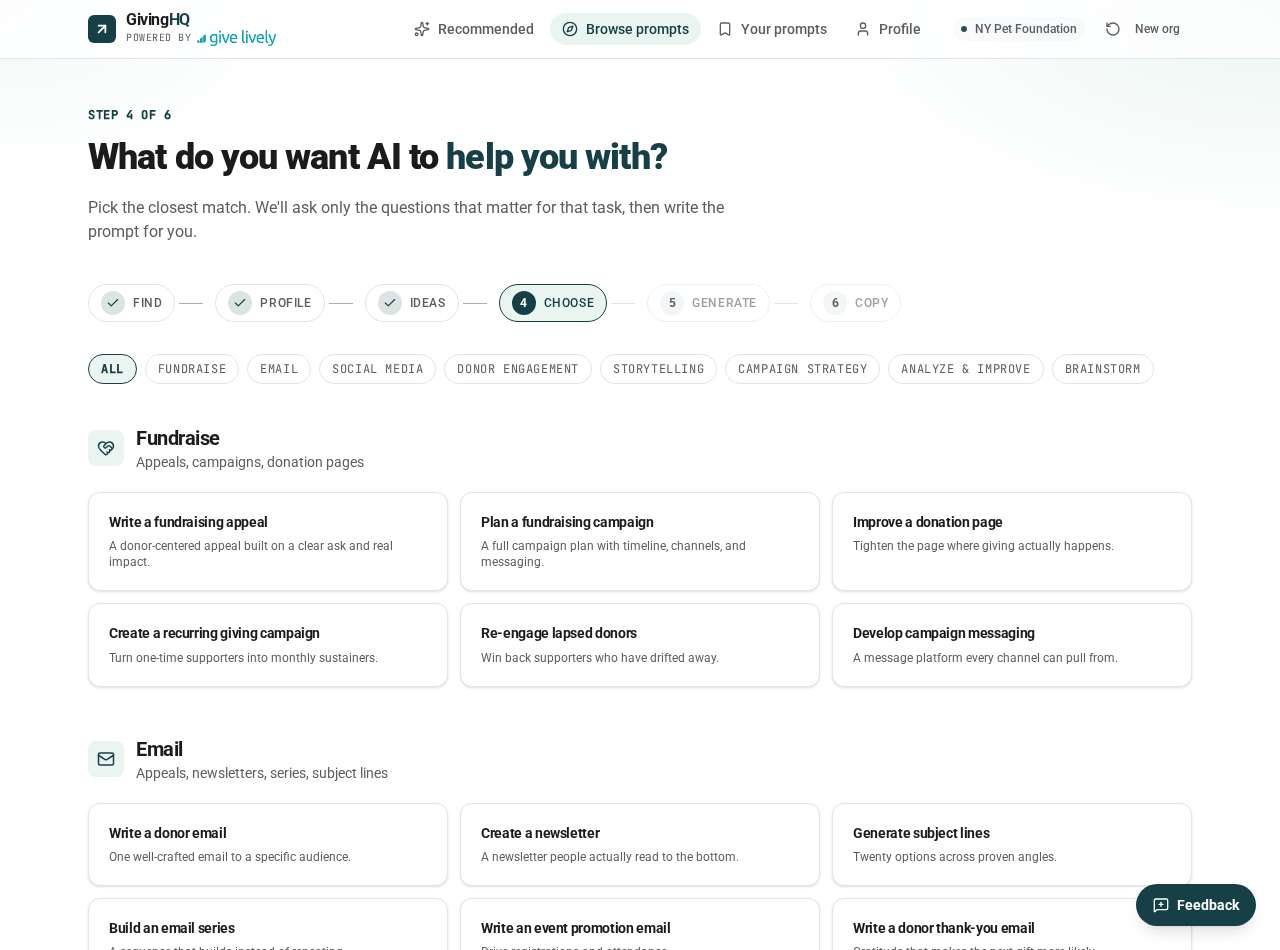
The library is organized by category: Fundraise, Email, Social, Donor Engagement, Storytelling and more. Each card explains what its prompt helps you do (see the image below). NY Pet Foundation chooses "Develop a year-end campaign."
5. Answer a few questions
GivingHQ asks a handful of questions specific to your task, such as your mission, your audience, your deadline and the impact of a gift. These answers turn a generic prompt into one that applies specifically to NY Pet Foundation’s goal of raising $50,000 by December 31 to fund 200 foster placements. A couple of minutes here saves far more time re-prompting later.
6. Copy your prompts and put them to work
Select “Generate my prompt” and you’ll receive a set of complementary prompts – a campaign strategy brief, a fundraising appeal, social posts and more – each with your organization’s context built in. Paste any prompt into the AI assistant of your choice. GivingHQ also saves your work under "Your prompts" in your browser, where you can copy it immediately or download it as a single file.
Strategic advice for better results
Set boundaries in your profile
The “what to avoid” field is where your ethics are woven into every prompt. Use it for the language standards your community expects, framings you refuse to use and a clear rule that AI should never invent stories, quotes or statistics. Because GivingHQ considers your profile when it generates materials, you set those boundaries once.
Pair GivingHQ with an AI use policy
If your organization doesn’t have an AI use policy yet, create one. TechSoup offers a guide and a free template that it estimates takes under an hour to complete. Then make sure your GivingHQ profile reflects your policy.
Keep personal information out of AI
Put your organization at the heart of your prompts, not individuals. Never paste donor names, giving histories or details about program participants into AI.
GivingHQ keeps your email address and other contact details private; they are never sold, rented or leased, and never sent to AI tools or used to train AI models. The nonprofit profile you establish in GivingHQ is used only to generate your prompts and all of it stays in your browser. You choose whether to share anything with AI.
Treat output as a first draft
AI can craft the structure of an appeal, but it can’t know the volunteer who drove two hours to pick up a frightened dog or the donor who has given every December for a decade. Add the real stories, specifics and gratitude yourself. That’s what donors respond to.
Start with the strategy brief
When GivingHQ returns a set of prompts, run the campaign strategy brief first, before generating appeals and social posts. This brief keeps AI consistent across all channels.
Make your prompts a shared asset
If board members, volunteers, peer-to-peer fundraisers or consultants use AI when writing on your behalf, share your downloaded prompts with them. They'll start from the same mission, voice and boundaries instead of building prompts from scratch, which means more unified messaging and fewer rounds of AI prompting.
Be human where it counts
As we’ve written before, the most valuable asset in the age of AI is our humanity. Used well, AI can handle some of the structural and repetitive work of nonprofit communications. That frees your team for the donor visits, volunteer check-ins and thank-yous no algorithm can replace.
GivingHQ is free and works with the AI tool of your choice. It takes about five minutes from start to finished prompts. Create your prompts at givinghq.givelively.org.
%201.svg)