For 2025 tax preparation, donors have access to their donation information

.svg)
.svg)
.svg)
.svg)

It’s tax season again and here’s what we’ve got to help nonprofits and their donors.
As we’ve done in past years, we assist donors who must file U.S. taxes by providing them with easy and secure access to a full summary of the 2025 donations they made to nonprofits through the Give Lively fundraising platform.
Access to the 2025 tax summary
A donation tax summary is available to donors at all times within our secure online Give Lively User Portal. This portal is designed for everyone who has contributed to a nonprofit through digital fundraising technology powered by Give Lively.
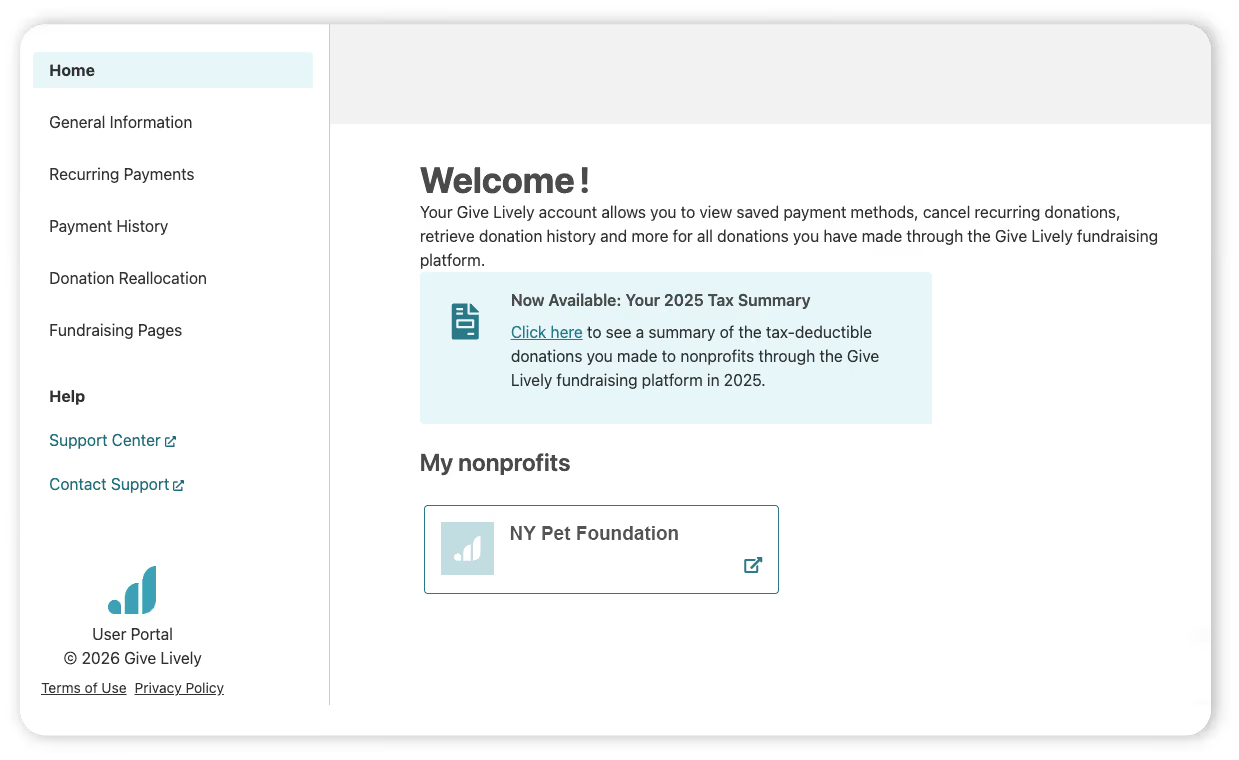
To log in:
- Any donor with an existing User Portal account can log in here and follow the “Now Available: Your 2025 Tax Summary” links.
- First timers on the User Portal must first create an account using the same email address submitted when donating. This needs to be a functioning email address and will be verified for the security of the account. If the donor has used more than one email address, a different account must be created for each email.
The 2025 tax summary
The “Your 2025 Tax-Deductible Contributions” page within the User Portal is a printable report organized around each unique customer name associated with the user’s email address. (For example, multiple family members may make donations using the same email address, but submit their own names when they fill out the payment form.)
Under each unique name is an alphabetized list of the nonprofits to which that specific customer donated in 2025 via Give Lively technology. We also show the total tax-deductible dollar amount (as reported to us) that each customer donated to that nonprofit. If needed, individual donation receipts are also available through the “Payment history” page of the User Portal.
Learn more about the donor tax summary.
Tax summary cheat sheet
We know that donors may contact nonprofits to request more information about a tax summary and/or missing receipts. In anticipation of that, here are some common questions and answers.
Where can donors access their tax receipts?
All receipts for past donations are available in the donor’s User Portal. Here’s how donors can find them.
Can Give Lively donation email receipts be resent to donors?
Donors can find their receipts in the User Portal (see above), but there’s no option to resend the email.
Can donors download a tax summary?
On-screen tax summaries are available within the User Portal. Donors can use the “Print” button on the tax summary page to print it out or save it to their computer as a PDF file.
What if donors don’t see a tax summary or are missing donations in the User Portal?
- If there’s no tax summary and a donor gave in 2025, the donor should confirm that the login email address for the User Portal is the one used to make the donation. If it is, contact Give Lively support.
- If a donor is missing a 2025 donation to an organization, the donor should check if the donation was placed on their behalf. If the nonprofit did so without logging out of its own Give Lively account, Give Lively data will show this as a donation from the nonprofit, not the donor. The data cannot be changed, but contact Give Lively support to explore other options.
- If a 2025 donation is missing from both the donor’s and the nonprofit's summaries, or if it is a mistaken donation, contact Give Lively support.
%201.svg)