How to audit payment methods for nonprofits

.svg)
.svg)
.svg)
.svg)
It’s the start of a new year and time to make informed adjustments to your nonprofit’s structures and plans. Like many nonprofits, you may not (yet!) have a formalized annual donor outreach plan, but whether or not that’s the case, don’t skip one often-overlooked area worth an audit, especially in a year of financial uncertainty: the effectiveness of different payment methods.
What is the value of a nonprofit payment method audit?
The goal of a payment-methods review is to better understand three things:
- which payment methods your nonprofit's supporters are most inclined to use
- whether you are maximizing your donors’ generosity by minimizing nonprofit payment processing fees
- whether there are alternative payment methods you can educate your supporters about to meet their interests and your own.
What to look at during a nonprofit payment method audit
All too often, nonprofits let payment decisions happen on autopilot. They abide by the decisions donors make based on available options. But sometimes a little data-based directed encouragement can lead to increases in nonprofit revenue and donor satisfaction.
Learn more about what you should look for when performing a nonprofit payment method audit:
Donor and donation data
Study how your donors give. Use your CRM to run reports (scroll to the bottom for instructions on how to do so in Salesforce) or download full data files and filter for the kinds of clues that can guide smart decisions. For insights about payment methods, core data points include: donation amount, whether transaction fees were covered, donation frequency, payment method, donor address, type of campaign and whether the donation was matched. Use them to assess the following.
1. Transaction volume and value
Create a report of total funds raised last year (or another selected time period) and filter it by payment method. Calculate how many donations and how much money were collected through each method, taking into account the types of campaigns – digital/in-person, general/specific, direct/peer-to-peer etc. Be sure to include both online and offline donations.
2. Average gift size
With all of the above in mind, gauge whether supporters give more or less per donation using certain methods.
3. One-time versus recurring giving
Separate out one-time and recurring donations and run similar analyses to determine how they compare to giving as a whole. This may influence decisions about donor retention programs for the coming year.
4. Demographics
How well do you know your donor population? Do you know its breakdown by age, work status, income, gender, location etc.? Assemble the demographic data available to you and consider how it factors into the conclusions you're drawing from the data above.
Transaction details
Included in the donation data you have compiled are details about how much that donation “costs” to collect, process and deliver. Review them all.
1. Processing fees
Almost all nonprofit fundraising platforms use major third-party payment processors to manage donation transactions. During nonprofit payment processing, these processors charge small transaction fees that are usually passed along to the donor, who may choose to cover them.
In addition, many fundraising platforms for nonprofits charge their own fees. (Give Lively does not charge its member nonprofits for use of our technology.)
Are you fully aware of all of these deductions and how they impact the net total you receive from each donation?
2. Channel performance/conversion rates
How carefully do you track your campaigns? If you do (highly advised), pull the data to get a sense of where you saw the most success. Think about the channels you used – email, snail mail, direct calls, print appeals, live appeals at in-person or broadcast events, social media etc. Look at how well you did, taking into account the performance of each payment method in each context.Some might be better suited to certain scenarios than others.
3. Fraud concerns
Have you struggled with fraudulent practices such as card testing, copycat websites, fake peer-to-peer fundraising pages or any other types of disruption? Have you reviewed the costs involved, both human and financial? Now’s a good time to do it, so you can anticipate and head off challenges before they happen.
Actions to take
Reduce costs
Payment processing for nonprofits doesn’t come without some costs, but you can take action to minimize them. Since the third-party fees attached to each payment method differ, start by making sure you know what these fees are and how to reduce them.
For example:
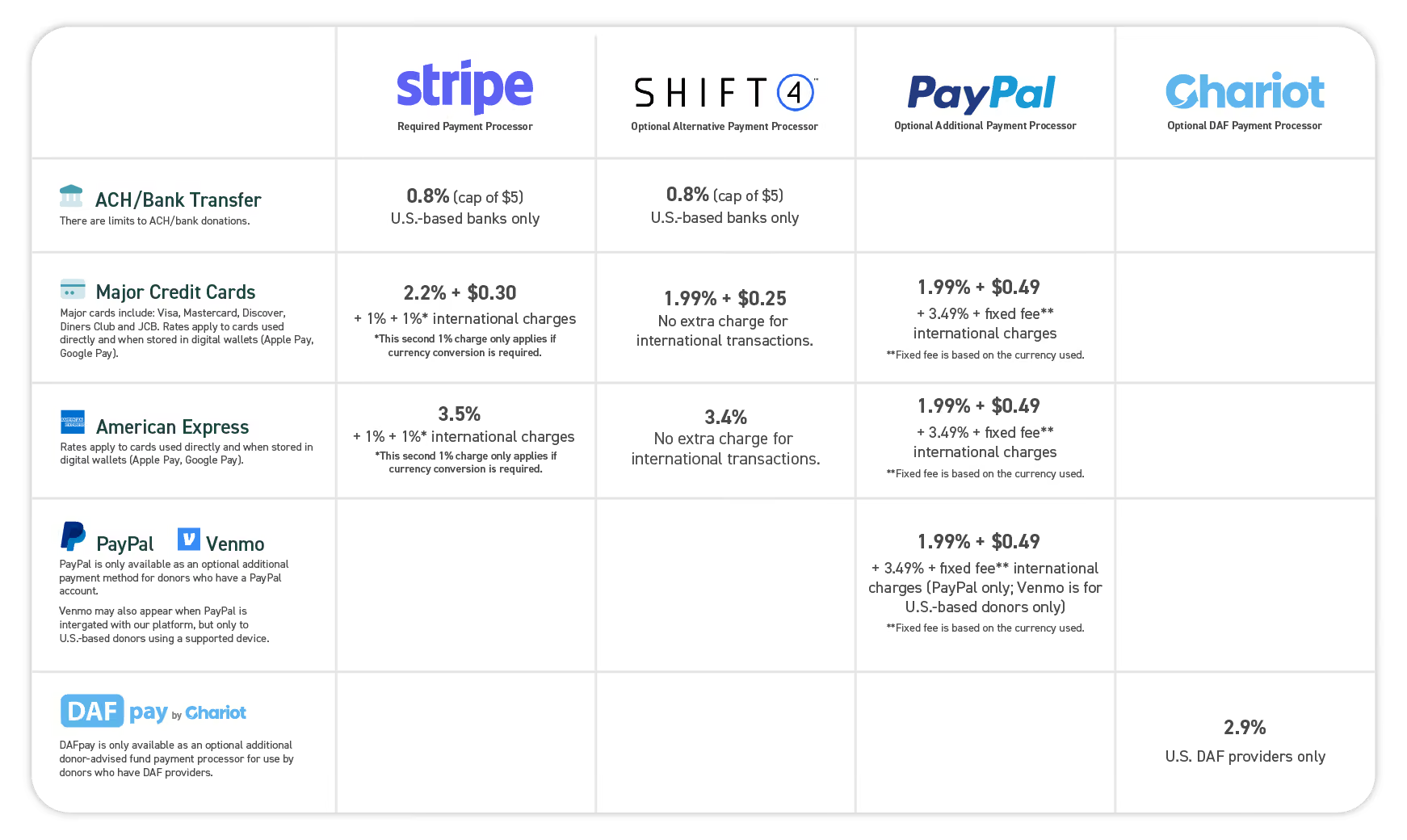
- Some payment methods see a small percentage deducted from each transaction. On the Give Lively platform, this is the case for all credit/debit card payments, as well as PayPal/Venmo and donor-advised fund gifts.
- Other payment methods also include a small fixed fee. On Give Lively, this occurs on all non-American Express credit/debit card payments and PayPal/Venmo.
- For donations paid by direct debit, banks place a cap on fees.
When assessing these fees, think about whether you are taking full advantage of cost savings. For example, at present on the Give Lively platform:
- Transaction fees for major credit/debit cards are lowest when domestic payments are processed by Shift4 and PayPal, and when international payments are handled by Shift4. (Shift4 is currently only available for one-time donations.)
- The low transaction fee and $5 cap on donations made by ACH/bank transfer make it less costly for any donation amount, but especially ideal for large gifts (there are no additional fees for any amount beyond $625).
- Even more granularly, the different fee formulas for credit/debit cards mean that, for Stripe processing, all domestic gifts under $23 net you more when donors use American Express; for all gifts above $23, it’s more beneficial if donors use a Visa, MasterCard or similar. The break point is $17.75 on Shift4.
See below for fees as they currently stand (January 2026) on the Give Lively platform.
In parallel with the above, calculate the work and cost of dealing with donation accidents or fraud. Is it easy for donors to reach out to you to request a full or partial refund? Do you know what to do when that is requested and have a person or people trained to handle it? In the case of fraud, have you done all you can to stifle it before it happens? If it occurs anyway, do you know what your options are and how best to avoid any financial ramifications?
Optimize for conversions
After you have completed your channel performance review and looked into the conversion rates of your campaigns seen through the lens of different payment methods, make useful adjustments.
For example:
- If you have a largely older donor base or one with accessibility challenges, consider emphasizing well-known, direct payment methods, like credit cards, checks or cash, especially a local events in person.
- By contrast, if you are working with a well-to-do or working-age audience, put forward ACH/bank payments, PayPal (low credit card fees) or donor-advised funds.
- And if you are appealing to people practiced in the use of modern technology, don’t shy away from mentioning digital wallets and Venmo, or encouraging the use of Text-to-Donate.
- If you have many overseas donors, remember the extra fees or limitations that may be involved in international giving.
The aim is to make it comfortable and easy for donors to give while minimizing the costs to your nonprofit. This also means enabling as many payment methods as needed to serve willing supporters. You might need to move beyond current practices and accept new approaches. Do not be afraid to tap into all of them!
Educate donors
Inherent in the efforts above is the value of educating donors about the benefits of giving through select payment methods.
One of the best ways to do this is to add a "Ways to give" page to your website that explains the options, describes the processes and advantages, and, especially, emphasizes your nonprofit's preferences.
For specific campaigns targeting audiences with clear giving preferences, make mention of the type of payment methods you know apply best to them and explain how they maximize donors' generosity.
Remember: A broad range of options need not be confusing or overwhelming if your target audience knows what to look for, how easy it is to proceed and why it is beneficial to choose one method over another.
For Salesforce users
Do you use Give Lively's native, direct Salesforce integration? Use the following guidance to run a quick report that breaks down your Give Lively donations by payment method.
- Open the “Reports” tab and create a new report.
- Select “Category" as “All" or “Opportunities," and click on “Opportunities with Payments” (NPSP required).
- Start a report.
- Edit your report filters to show opportunities with "Close Dates" of "All Time," and make the "Give Lively Donation ID" "not equal" to blank [leave the field blank] (this limits results to Give Lively Opportunity records).
- In the “Outline" tab, choose “Group Rows" by "Payment Method”.
- Edit the “Amount" column and choose “Summarize" > “Sum."
- Click "Add Chart" and a new bar chart should be added, automatically grouped by payment method. If you like, you can edit to show “Sum of Amount" rather than "Record Count.”
- Make any other desired edits or inclusions and click "Save and Run."
Put time and attention into the choice of optimal payment methods to maximize your donors’ support and experience. Data-driven decisions ensure more of every dollar gets where it is needed most.
Choose Give Lively's nonprofit fundraising platform with multiple payment methods
The Give Lively fundraising platform for nonprofits is optimized for multiple payment processors and payment methods. We know the importance of affordable payment processing for nonprofits and the value of meeting donors' needs. We've integrated with leading payment processors, such as Stripe, PayPal and Shift4, all of which offer discounted rates to qualified nonprofits. We make available a broad spectrum of payment methods, including banks, cards, digital wallets and donor-advised funds. And, critically, we charge $0 to nonprofits for our digital fundraising platform and we transparently show all payment processor fees.
Learn more about our nonprofit fundraising platform today.
%201.svg)